AORecomp: Anarchy Online classic in the browser
AORecomp is a WASM reconstruction of classic Anarchy Online 14.9.1, with mobile touch controls and a convenient single binary Go server. Players can simply point their web browsers to the server, which serves both the WASM client and the game server engine. Unlike other recent projects in this space, this project does not aim to improve graphics, but rather tries to capture the original aesthetic. The work was carried out with heavy LLM assistance. A lot of the game logic and game data only existed on the original game server, so the LLM has done a lot of guessing here, as well as leaning on other reverse engineered server projects like CellAO and AO Rebirth. The client was recompiled to WASM by using https://rea.tools/ and Ghidra. First milestone was to round trip the original Windows version, then port it the Linux/SDL, and then finally to browsers via WASM and WebGL. I'm planning to run the demo server for some months, but probably not for the long term. Source and binaries are available, so I encourge you to git clone this. Or just grab the pre-built binaries if you just want to run your own server without modifying. Or use it as a starting point or inspiration for your own project. It's great fun to run your own sandbox server and use the admin interfaces to teleport your character around Rubi-Ka and explore places that were difficult to reach back in the day. I could also imagine this concept of a browser based client working nicely with the more established mature reverse engineered servers out there.
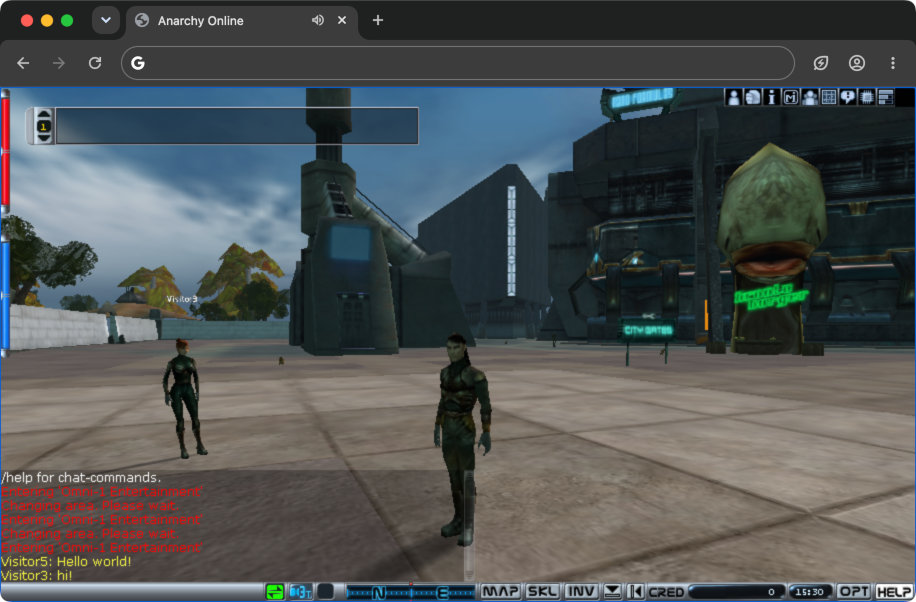
Choose the level of control and customization that suits you, from playing immediately to modifying and compiling the game yourself:
Option 1: Play now
Play ao in your browser. No installation is needed. The first load can take a few minutes.
Option 2: Run your own server
Download the server for your machine. Each binary includes the browser client and game resources; no build tools are needed.
- Windows x64 (0.0.3)
- Linux x64 (0.0.3)
- Linux ARM64 (0.0.3)
- macOS Intel (0.0.3)
- macOS Apple Silicon (0.0.3)
Run the downloaded file from a writable directory. On Linux and macOS, first
make it executable with chmod +x <filename>, then run ./<filename>.
On Windows, run the .exe.
If macOS blocks the first launch, open System Settings > Privacy & Security, scroll down and click Open Anyway, then confirm Open in the prompt.
Keep the server running and open localhost:8080 to play, or localhost:8080/admin for the admin dashboard. Create the first administrator on first visit. See the server setup guide for access from other devices.
Option 3: Modify and compile the server and game logic
Install Go 1.26 or newer, then clone and run:
git clone https://<server>/code/aorecomp.git
cd aorecomp/server
go run .
Edit Go code in server/ and game definitions (NPC spawns and scripts) in
server/gamedata/, then restart the server to apply your changes. The compiled
browser client is included, so you do not need a WASM toolchain for server-side work.
Default builds read ./assets/ from the launch directory. To build a standalone
release from the repository root, use CGO_ENABLED=0 go build -tags embedassets -o aorecomp ./server.
Option 4: Modify and compile the client
Clone the repository as above. Client sources and browser controls live in
client/. Follow the browser toolchain setup,
then build and publish the WASM client from the repository root:
python3 tools/client/build_wasm_dependencies.py
make -C client -f Makefile.wasm -j8
python3 tools/client/publish_wasm.py
(cd server && go run .)
Publishing updates the browser files in server/assets/client/. Restart the
server and reload the game; rebuild standalone embedassets binaries to include
the new files. The first client build takes
substantial time and several gigabytes of build space.
You can optionally build a native Linux or Windows client with make using the
platform setup instructions. These clients have
been tested less recently and may have bugs that the WASM client does not.
See the developer guide for detailed builds and testing, and the documentation index for architecture and research.