Project history and server operation
Build/run details and maintainer guidance are in DEVELOPERS.md. Historical experiments below are evidence, not required setup steps.
Development notes
The selected target is Anarchy Online 14.9.1, preserving classic Rubi-Ka scenery and GUI. The eventual goal is a web remake. The current native C round trip reconstructs the complete game, renders the saved Bronto Burger view, accepts movement, and matches the inspected stock chat glyphs. The version evaluation and stock-client tests record why this version was selected.
Start with docs/README.md for original-client research: observed behavior, recovered protocol, extracted game data, reverse-engineering evidence, historical-server inferences, and open questions.
The editable, reconstructed C game is in client/.
Its checked-in sources cover Clientr.exe and all 33 game DLLs. The root Makefile
builds them into client/build/game.exe; see that directory's README for
the Windows build command.
The standalone build compiles and runs without original game EXE/DLL inputs. Non-code data and resources are compiled from checked-in C initializers. Ordinary assets and vendor libraries remain external.
The mounted release disc was extracted with Unshield rather than installed.
old_wip/clients/original-11.0/Gamefiles is the untouched reference. old_wip/clients/local-11.0 is the
11.0 working copy; client-peer is a second 11.0 copy for reference and multiplayer
checks. client-target is the separately upgraded 13.2 working client. The modern
installation at C:\Funcom\Anarchy Online is untouched.
The selected 14.9.1 binaries and assets are in anarchy-vanilla-14.9.1; the previous
editable C baseline is preserved locally in old_wip/decompiled-13.2/.
Build and run the 14.9.1 reconstruction
& .\toolchains\llvm-mingw-20261006-ucrt-x86_64\bin\mingw32-make.exe -j4
$serverDirectory = Join-Path $PWD 'local/client/fonts/server-14.9.1'
Start-Process "$serverDirectory/server.exe" -WorkingDirectory $serverDirectory -WindowStyle Hidden
python tools/client/verify_game.py client/build/game.exe anarchy-runtime-14.9.1
Start the isolated server only once; it uses localhost ports 7510/7511/8081.
The verifier launches at BB, permits 120 seconds for validation, then stops its
client. Native F12 screenshots are saved in anarchy-runtime-14.9.1/Screenshots/.
See client/README.md for the existing bundled Python,
standalone inputs, and source-edit/rebuild test. The server preparation
workflow is in 14.9.1 validation.
Run the stock 14.9.1 client against the main server
From this directory in PowerShell:
go run ./server -login-port 7520 -world-port 7620 -http-port 8180
In another PowerShell terminal:
cd C:\path\to\ao\anarchy-vanilla-14.9.1
$env:ANARCHY_CD = 'cd_image'
$env:ANARCHY_SETUP = 'Setupf'
.\Clientr.exe localtest localtest 1 2130706433 7620 0 0
Use a character ID listed in http://127.0.0.1:8180/control; IDs from another
server's data copy do not necessarily exist here. The example uses ID 1.
The port in the client command is the world port, not the login or HTTP port.
The environment supplies the launcher's asset/setup paths. Omitting
ANARCHY_SETUP can crash the stock client before login. Prefs/Main.cfg
must contain FullScreen 0 for windowed mode.
The server binds only to localhost: HTTP 8080, login 7500, and world 7501.
Configure the ports independently, for example:
go run ./server -login-port 7520 -world-port 7620 -http-port 8180.
The dimension list, login replies, browser launch command, and zone redirects
advertise the configured ports. Each flag can be used on its own.
Point a separate client's dimension-list URL at the second instance's HTTP
port; the direct-launch Python helpers still use their fixed default ports.
Run each instance from a separate working directory with its own data/
copy, especially data/world.sqlite, so the instances cannot overwrite each
other's saved users. Build an executable first to run it outside this checkout.
The main server selects the recovered 14.9.1 world layout from its cookie packet and retains the original 11.0 layout for release clients. The preserved 13.2 client needs its older server build. No Python proxy is needed.
Recovered media and patch provenance are listed in versions-and-patches.md.
To quit, press X to sit, then choose OPT > Quit > To Windows. The original logout countdown takes 30 seconds. Pressing X to stand prevents logout, although the client's countdown bar currently remains visible.
Open http://127.0.0.1:8080/admin to sign in, list saved players, and
change the game time immediately. Follow a player's name to edit their character
through grouped form fields or open their Teleport map. Offline
users and users reconnecting during a teleport stay on the list.
The page uses plain HTML forms and a small JavaScript canvas map. The world starts at
13:30. Rubi-Ka has a 27-hour day, running at 15 game seconds per real second.
Hour values range from 0 to 26; minutes range from 0 to 59. The clock, characters,
items, NPCs and other variable state live in data/world.sqlite and survive
restarts. Player movement saves every 20 seconds. The world checks for pending
saves every second; routine NPC saves are staggered at 20-second intervals in
occupied zones. See world storage. Each local user currently
owns one character, with a stable ID. Walk/run mode is saved in the running
field and supplied in the initial vehicle state on login and zone reconnect.
Saving character data
refreshes an online character through the native zone reconnect sequence.
Use the web editor while the server runs. Form submissions update database
records. The database is local development data and is ignored by Git.
To extract the control UI's map tiles from anarchy-vanilla-14.9.1, run from
the repository root:
.\venv\Scripts\python.exe -m pip install -r tools/requirements.txt
.\venv\Scripts\python.exe tools/data/extract_maps.py
Restart the Go server to load the map UI code. Generated tiles in data/maps/
are ignored by Git. The main page shows players on Rubi-Ka; player pages
center on the selected character. Drag to pan and scroll or use the buttons
to zoom. Use Find zone on either page to focus a named outdoor zone in the
Rubi-Ka map; this changes the map view without moving a character.
Tiles load on demand, with detailed overlays for all 46 outdoor
playfields with recovered planet-map origins, including the three Rome
districts. Large areas have an additional coarse resolution for regional
views. Detail tiles are at most 1024x1024 pixels and load on demand;
content-based filenames let the browser cache them across visits. The map
keeps a 256 MiB LRU budget for decoded images, retaining visible tiles.
Tile loads wait for zooming to settle and run at most six requests at once.
Each extraction removes obsolete PNGs after writing the new manifest.
All other extracted terrain maps are available as separate local
views; no world placement is invented for them. Map offsets are maintained
in server/gamedata/map_coordinates.yaml; generated dimensions, boundaries, levels
and tile paths are in data/maps/manifest.json.
On a player page, click a destination and press Teleport here. Choose the destination playfield when map bounds overlap. The server calculates terrain height, but does not check building or obstacle collisions. Indoor players appear at their return entrance when known; players without a known world placement are marked in the users table. See maps.md for the recovered coordinate and imagery formats.
For an autonomous two-client check, start the server and run:
.\venv\Scripts\python.exe old_wip\tools\launch_clients.py
This reference check uses the existing 11.0 old_wip/clients/local-11.0 and client-peer directories, creates
two synthetic local sessions, and supplies the original launcher's environment.
Both working copies have windowed graphics configured.
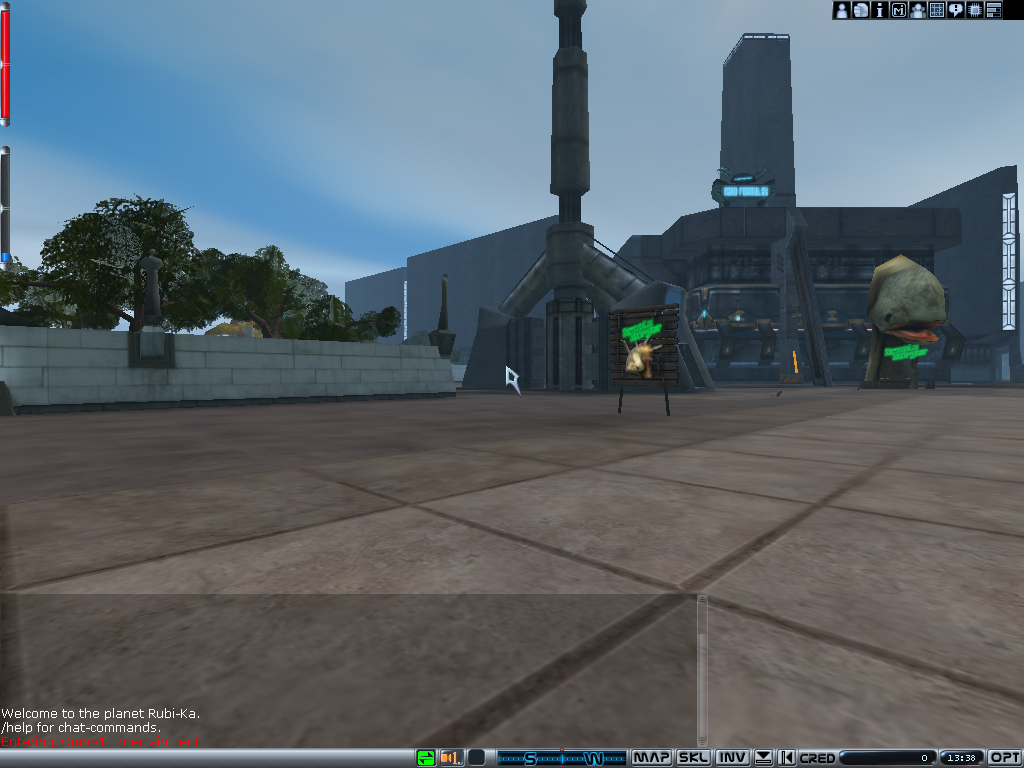
Bronto Burger reference view
The 14.9.1 comparison capture also preserves BB and the building behind it. Its identical chat lines match the clean 13.6 reference pixel-for-pixel; see the validation report.

This street-level viewpoint in Omni-1 Entertainment, facing northeast, shows Bronto Burger on the right and the large building behind it. It was captured in the stock 13.6 client and confirmed by the user as the intended view. Use this same position and direction for scenery comparisons between client versions.
Set these character fields before launching the client. The position is the camera's starting location, not the coordinates of the stand itself:
playfield: 705
position: [960, 16.5, 510]
rotation: [0, 0.9238795, 0, -0.3826834]
Position uses [x, y, z]; rotation is the [x, y, z, w] quaternion. Set the
server time to 13:30, allow at least 30 seconds for the world to load,
then press F8 to switch to first person. Press F12 for the client's
native screenshot, saved in its Screenshots directory.
Verified progress
- Stock 14.9.1 loads Omni Training through the main server and remained connected during a 30-second isolated native-client check.
- With its preserved server build, 13.2 connects directly to Go, renders heads/NPCs, walks, and completes the Omni Training/Borealis teleport roundtrip.
- The original launcher loads the local dimension list and informational page.
- The login challenge and character list are accepted.
- A level 1 Soldier named Local Explorer appears in character selection.
- Play launches the original 3D client and connects to the local world port.
- The world client sends its character cookie and periodic ping packets.
- The local server loads the original Omni Training playfield (950).
- The original 3D scene, welcome message, and player body render in a window.
- Walking and turning work; the server receives changing player coordinates.
- Two original clients connect with separate identities and render each other.
- Compressed client movement is decoded and relayed to players in the same zone.
- Original-district points generate shared NPC populations across the world.
- Creatures wander near their spawn points, with pauses between walks.
- Teleporting to Borealis reconnects the same character and loads that zone.
- Returning to training removes and respawns the player in the other client.
- Player heads render with the original Solitus head mesh.
- Game time initializes daylight and can change live through the control page.
- Original hand skin textures replace the solid-green default hand material.
- Named outdoor zones can be found on the map; player maps provide teleport controls.
- X toggles sitting and standing; Quit to Windows finishes after 30 seconds.
The first two milestones are working. The native launcher lists saved users; an empty server creates a level-1 Solitus Soldier. The direct-launch test helpers create fresh saved users. Positions and zone membership are shared. Movement is simulated by the original client; the server relays it without validation. Creature roaming is provisional: paths stay within four metres of each spawn, with 1.5-metre-per-second walking and three-to-eight-second pauses. The client continues moving between start and stop commands. Fixed spawns and human placeholders stay at their posts. Roaming ticks visit only roaming creatures in occupied zones, using an index rebuilt on NPC reload. With no clients connected, the tick returns without visiting any NPCs. Outdoor roaming follows decoded terrain while preserving each spawn's authored ground offset. Indoor floor sampling, wall avoidance and pathfinding, combat, other NPC behavior, chat, and account security remain unimplemented. Character creation and editing cover the fields currently decoded by the server; inventories, equipment, and most gameplay stats are still placeholders.
The removed standalone terrain prototype used the original Omni Training height grid for a terrain and movement experiment; the Windows clients remained the reference for the complete scene.
The server loads outdoor height grids from data/terrain.bin at startup. To
rebuild that file from the original disc data, run
venv\Scripts\python.exe tools\data\extract_terrain.py from this directory. It checks
every block's dimensions, corner heights and shared edges. Height interpolation
is approximate; buildings, walls and incorrect initial spawn heights still need
separate handling.
Screenshots are saved in local/reports/multiplayer.png, local/reports/npc.png, and
local/reports/borealis.png. local/reports/daylight-heads.png shows the corrected heads and
daylight; local/reports/control.jpg shows the controls. The appearance and character
stats are placeholders.
local/reports/hands-fixed.png and local/reports/control-dropdown.jpg show the hand fix and
zone dropdown. Old Athen also loads through the dropdown. Not every map has
been verified: the Grid shows error textures and the nightclub arrival can
place the camera inside geometry. Indoor arrivals need tuning. World map
origins outside Borealis are currently zero.
The catalog comes from the release resource database and launcher name list.
Outdoor arrivals use decoded terrain heights; indoor arrivals use district
coordinates. Regenerate it from the original files with
venv\Scripts\python.exe tools\data\extract_playfields.py, then review
local/reports/playfields.generated.yaml against server/gamedata/playfields.yaml. Extracted data is retained in local/reports/original-playfields.json.
See docs/protocol.md for original-client evidence.
REA bundles and provider snapshots are saved under tools.
NPC data
The selected 14.9.1 client supplies 370 district resources and 290 monster
appearance definitions. The provisional generator represents 68,609 requested
NPCs in 251 playfields, excluding internal dependency maps. Species assignments
and complete NPC templates remain unresolved in many cases. Human placeholders
use a Solitus model; creature placeholders reuse the Leet model. The editable
server/gamedata/npc_names.yaml adds sourced name inferences without claiming to resolve
their appearances. See the population findings.
Fixed positions and minimum levels are preserved, including entries above level 255.
Ordinary points are assigned in order and reused with small offsets inside their
radii when necessary. Districts without points use a grid around their centre.
These placement rules and appearances are approximations, not recovered server
logic. local/reports/npc-coverage.json records counts, appearance classifications and
placement types. AI, combat, dialogue and respawn are not implemented.
NPC batches live in server/gamedata/zones/zone_<id>.yaml, grouped by district and
original template code. Edit their names, MonsterData, packed appearance,
levels or XYZ rows directly. appearance_status and placement_status refer
to structured confidence notes in server/gamedata/population_evidence.yaml; each batch also has a
free-text comment. YAML # comments are supported. A fixed coordinate can be
authored while the appearance remains a placeholder. Levels use the authored
minimum; the original server's level selection remains uncertain.
The YAML is embedded into the binary and decoded at startup. Rebuild and restart
after edits. Each group has a stable ID for Go behavior code, and the raw source
record in the same zone file retains hashes, offsets, radii, levels and timings.
Extraction candidates remain in local/reports/ and do not overwrite the
maintained definitions.
Regenerate the extracted catalogs from this directory:
.\venv\Scripts\python.exe -m pip install -r tools\requirements.txt
.\venv\Scripts\python.exe tools\data\extract_npc_spawns.py
.\venv\Scripts\python.exe tools\data\extract_monsters.py
.\venv\Scripts\python.exe tools\data\generate_npcs.py
The outputs are local/data/npc-spawns.json, local/data/monsters.json,
local/reports/npc_spawns.generated.yaml and local/reports/npc-coverage.json. The old 11.0 exports and
data/npc_spawns-11.0.yaml remain preserved.
The coverage report describes the generator output; manual YAML edits are not
reflected in that report. docs/game-data.md records the decoded layout,
original training-area entries and evidence. Research leads for other
server projects are in docs/open-questions.md.
The version-matched item and nano catalog is extracted with
venv/Scripts/python.exe tools/data/extract_items.py into ignored local/data/items.json.
The authoritative catalog and extraction evidence are embedded YAML in
server/gamedata/items.yaml and server/gamedata/items/; the JSON is an optional review candidate.
This recovers definitions; owned inventories and item gameplay are not implemented.
Validate
& 'C:\Program Files\Go\bin\go.exe' test ./server